
Results
Here's what changed, before going into how:
- Mobile load time: over 5 seconds → under 1 second
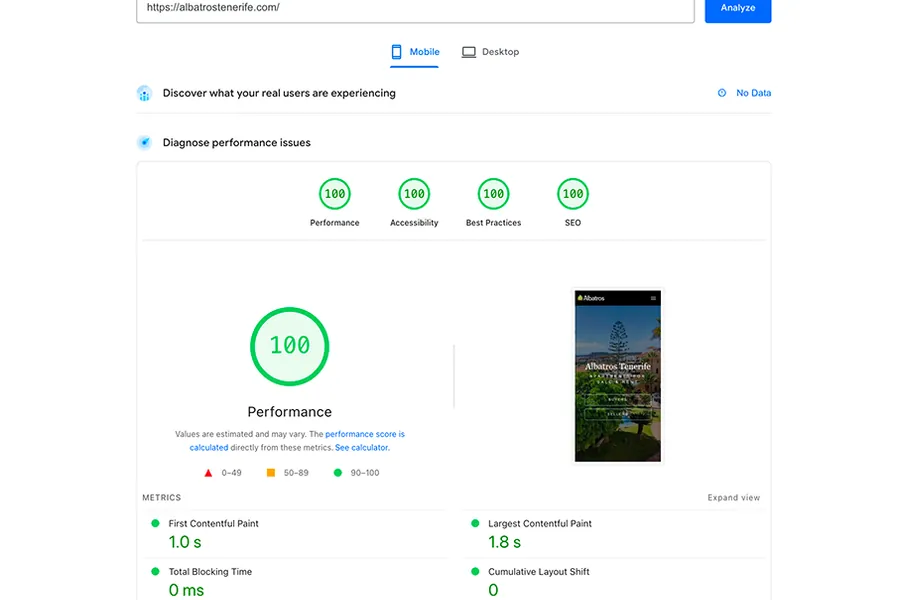
- Lighthouse on mobile: 57 → 100 (Performance, Accessibility, Best Practices, and SEO all at 100)
- Core Web Vitals on mobile: LCP 1.8s, FCP 1.0s, Total Blocking Time 0ms, CLS 0
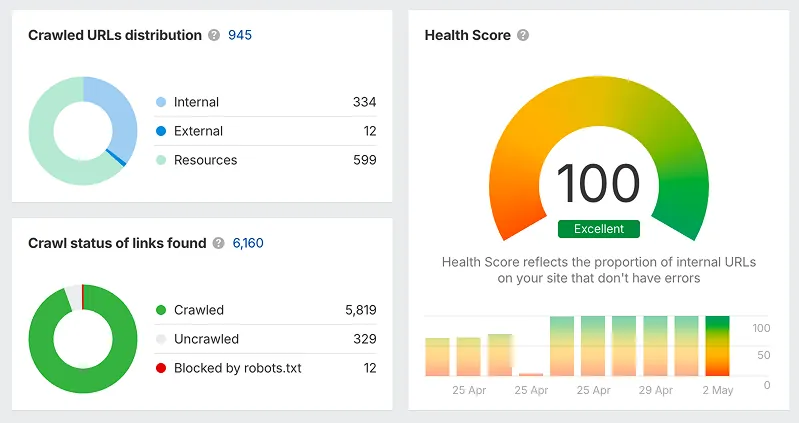
- Ahrefs Health Score: 100, with 0 errors across 945 crawled URLs
- Search impressions: around 250 per week → over 1,000 per week, still climbing
- Search clicks: around 10 per week → around 50 per week
- Six languages: managed in one Sanity document instead of six separate entries
- Publishing a new listing: from a slow, error-prone process → live across all six languages in about a minute
This is a case study about migrating a multilingual real estate website from WordPress to Astro + Sanity. If you run a property site in several languages and you're hitting performance or SEO problems, this is a common situation, and there's a fairly direct way out of it.
The client is a real estate agency on Tenerife selling to buyers from six countries — UK, Spain, Czech Republic, Poland, Hungary, and Italy. Six languages, active listings, a blog, and a contact flow. The site was on WordPress. It worked, but it was slowing the business down.
Why WordPress Struggles With Multilingual Real Estate Sites
This is one of the most common problems I see on property websites. WordPress wasn't built for multilingual content — every multilingual feature comes from a plugin, and at scale those plugins create a predictable set of problems.
Why these sites get slow
Every page load runs database queries, PHP, and a stack of plugins before any HTML reaches the visitor. Image handling depends on plugins with inconsistent optimization. Caching plugins help, but they don't fix the underlying architecture. The result is that a typical WordPress real estate site loads in 4–7 seconds on mobile, which is well past the point where most people leave.
This client's homepage was taking over 5 seconds on mobile. Most buyers were gone before they saw a single property.
Why the SEO gets messy
A few problems show up again and again on multilingual WordPress sites, and they're hard to fully solve with plugins:
Duplicate content. Translation plugins like WPML or TranslatePress create separate URLs per language. Without careful canonical setup, search engines can read these as duplicates and split the ranking signals between them.
hreflang. Correct hreflang means telling Google exactly which URL maps to which language and region (en-GB, cs-CZ, pl-PL, and so on). Plugin-generated hreflang is often incomplete, especially when some pages don't have every translation.
Structured data for listings. Google can show rich results for property listings — price, location, type — but only if the schema.org markup is right. Plugins give you basic schema; property-specific structured data usually needs custom work.
Slow indexing. When a site is slow and its metadata is inconsistent, Google crawls it less often, so new listings take longer to show up.
All of these were present here.
What Actually Changes With Astro + Sanity
The core difference is where the work happens.
In WordPress, every page is assembled on the server when someone requests it — query the database, run the plugins, render the template, then send it. Flexible, but slow.
With Astro, pages are built ahead of time as static HTML and served from a global CDN. There's nothing to process when a visitor arrives. The page is just there. For a real estate site with a lot of listing pages in several languages, that difference is significant.
To be fair, there's a trade-off. WordPress gives you a visual editor and a large plugin ecosystem. Moving to Astro + Sanity trades some of that for speed, control, and a cleaner content structure. For this client, that was the right trade — but it's worth saying plainly.
The Stack I Used
- Astro for the front-end. It ships almost no JavaScript by default, which is most of why the site is fast.
- Sanity as the CMS. All six language versions of a listing live in one Sanity document, edited side by side.
- Cloudflare for hosting on the global edge.
Most of the site is statically generated. I only used server-side rendering where it was actually needed — the filtered listing pages — so the client isn't paying for compute on pages that don't need it, and those filter pages aren't meant to be indexed anyway.
On mobile, the result is a clean sweep — 100 across Performance, Accessibility, Best Practices, and SEO, with Largest Contentful Paint at 1.8s and no layout shift.
On top of that: correct hreflang per language-region, schema.org markup for property listings (RealEstateListing), clean canonicals, an auto-generated sitemap, contact forms with proper email delivery, and Umami for privacy-first analytics. SEO fields like meta tags and Open Graph are managed in Sanity too, so the client controls them without touching code.
Keeping the SEO You Already Have
The most common worry with any WordPress migration is losing rankings and breaking old links. That's a reasonable worry, and it's handled as a standard part of the process, not an afterthought.
Old URLs are mapped to the new ones with 301 redirects, the URL structure is kept where it makes sense, and the technical basics — canonicals, sitemap, robots, 404 handling — are set up from the start. The goal is that search engines see a faster, cleaner version of the same site, not a different one.
An Ahrefs site audit after launch came back with a Health Score of 100 and zero errors across 945 crawled URLs.
What Happened After Launch
The point of all this is search performance, so here's the part that actually matters. The new site went live at the end of April. From that point, Google Search Console shows a clear change: weekly impressions went from around 250 on average to over 1,000, and they've kept rising week over week. Clicks moved from roughly 10 a week to around 50 over the same period.
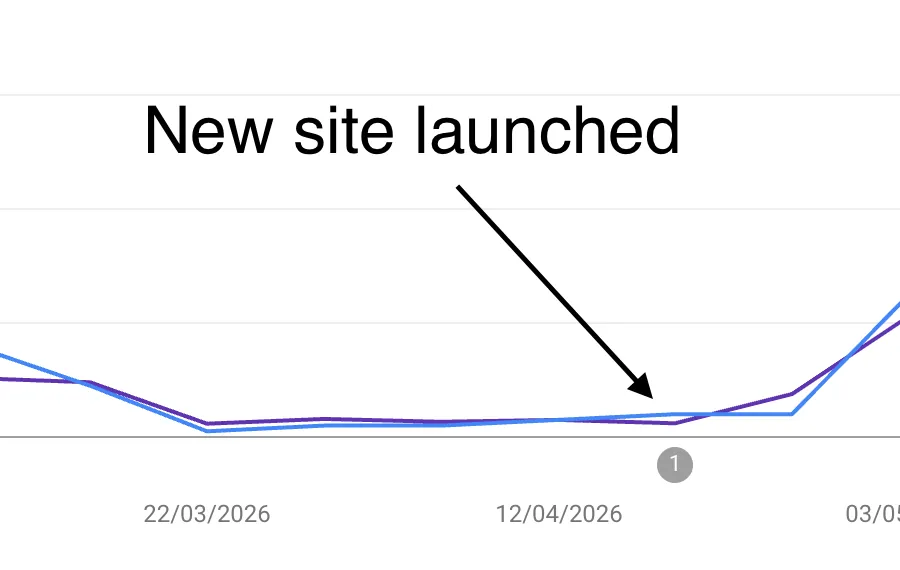
The timing lines up with the launch — the climb starts right after the new site was indexed. A faster site with clean hreflang, valid structured data, and proper indexing is what made that possible, where the old WordPress setup was holding it back.
The Day-to-Day Difference
Before, adding a listing meant working in WordPress, filling in six separate language entries, making sure no plugins conflicted, and checking every page by hand after saving.
Now the client opens Sanity, fills in all six languages side by side in one view, and clicks publish. The listing is live across all six versions of the site within about a minute. For a site that adds and updates properties regularly, this is the part that matters most.
What the Migration Looked Like
Content. Existing listings, blog posts, and pages were exported and moved into Sanity. For this project that was 18 listings and 20 blog posts across 6 languages, with a partly automated process — nothing was lost or rewritten without reason.
Build. The new site was built with the existing design, full multilingual routing, and a Sanity setup configured around how the team actually works.
Handover. The client got a working site and a CMS they can manage themselves for content. They don't need me to publish a listing.
Who This Makes Sense For
A move from WordPress to Astro + Sanity is worth considering if you manage a multilingual property site and updates take far longer than they should, if the site is slow despite optimization and it's affecting rankings, if you keep running into hreflang or duplicate-content issues across languages, or if you need a developer every time you want to publish a listing.
The same pattern applies outside real estate — hospitality, legal, medical, and professional services hit the same wall when multilingual content and SEO performance both matter.
One honest boundary: I'm not an SEO strategist or a copywriter. I don't do keyword research or write your content. What I do is the technical side — the Sanity content model, the relationships between listings and pages, the markup, the performance, and the structure that lets both people and search engines find the right page quickly.
If you're dealing with a slow WordPress site or struggling to manage SEO across a multilingual property site, get in touch — I'll look at your current setup and tell you honestly whether a migration is worth it.
FAQ
- How long does a WordPress to Sanity migration take?
- It depends on the amount of content and the design, but a project like this one is usually a few weeks. Exact timing is easier to give after looking at the current site and the scope.
- Will I lose my SEO rankings after migrating?
- That's the main thing the process is built to protect. Old URLs get 301 redirects, the structure is preserved where it makes sense, and the technical SEO is set up from the start. Search engines should see the same site, just faster and cleaner.
- Can my team still edit content without a developer?
- Yes. That's most of the point. Content lives in Sanity, and the team publishes and edits without touching code.
- What happens to my existing URLs?
- They're mapped to the new ones with redirects, so old links and indexed pages keep working.
- Does this only work for real estate?
- No. Any multilingual, content-heavy site where speed and SEO both matter runs into the same problems and benefits from the same approach.